机况 MacMonitor
See what the machine is actually drawing from the wall.
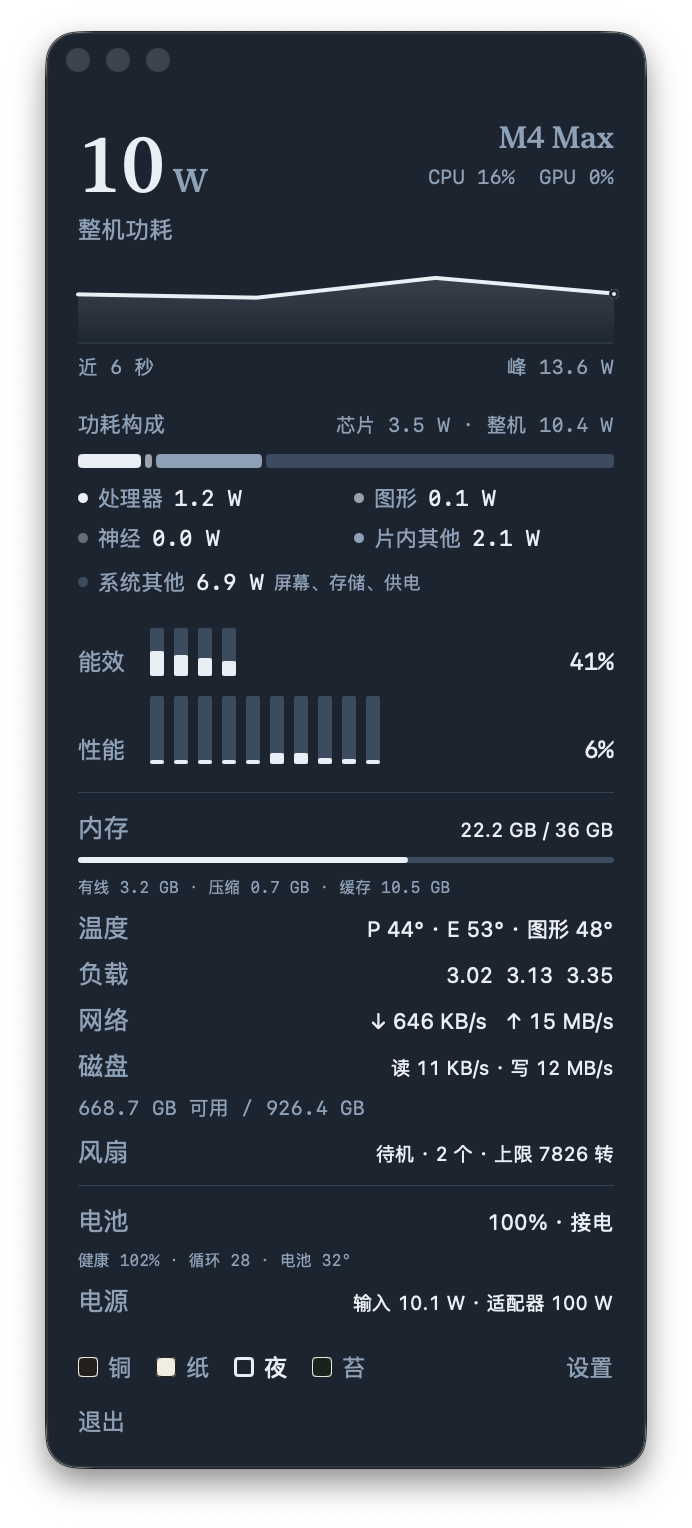
Whole-machine power in the menu bar, with per-core load, temperatures, memory pressure, fans and battery in a panel that asks for no permissions and makes no network calls.
Free during launch Every build on this site is free during the launch period. Paid editions and App Store listings come later; nothing here needs an account or a key.
macOS 14+ Apple Silicon No permissions No network Tools v0.4.0
01What's inside
The specifics, with numbers.
The things a general-purpose tool does not do.
01
Power, broken down
Whole-machine, SoC, CPU, GPU and Neural power, a composition bar and a 90-second curve.
02
Every core
Efficiency and performance core load, plus CPU and GPU utilisation.
03
Thermals and memory
P-core, E-core, GPU and battery temperatures; wired, compressed, cached and swap memory with pressure.
04
The rest of the machine
Network up and down, disk read/write and free space, fan RPM and maximum, battery health, cycles, adapter input and rated power.
05
Yours to arrange
Four themes, separate font scaling (80–135%) for the top readout, power block, cores and readouts; any area can be hidden.
06
No footprint on your privacy
No network, no admin rights, no special permissions. Apple Silicon, macOS 14+.
02Gallery
A closer look.
Real screenshots where they exist. Where a capture is missing, the frame says so.
Screenshot pending
Menu-bar-only mode, with one number.
The build is real; the picture will follow.
Screenshot pending
Theme and font-scaling settings.
The build is real; the picture will follow.
03Get it
Download the build.
Everything is free during launch — the same binaries the studio tests. No account, no key.
Free during launch Every build on this site is free during the launch period. Paid editions and App Store listings come later; nothing here needs an account or a key.
macOS v0.4.0
MacMonitor-0.4.0-macos.zip
Developer ID signed and notarised.
Download · coming soon Download for macOSSigning and sideload notes are on each build. iOS builds are unsigned; macOS builds marked ad-hoc are not notarised.
04More from the bench
Keep looking around.
Other tools from the same bench, built to the same rules.